8 Birthday Party Photo Display Ideas to Try
Explore 8 birthday party photo display ideas, from live QR-code walls and slideshows to timelines, garlands, and keepsakes guests can enjoy.
You've got the cake ordered, the guest list almost settled, and a phone full of photos that somehow haven't made it into a single album. Now you're wondering how to show the best ones at the party without passing your phone around the room or spending the whole week with tape and printed card.
That's exactly where good birthday party photo display ideas earn their place. A memorable display does more than decorate a wall. It gives guests something to talk about, invites them to contribute, and leaves the birthday person with a keepsake that captures perspectives you'd never see from behind the host's camera.
Scale matters. A survey cited by Chuck E. Cheese covered 4,907 parents across 39 countries and found that 60% said their children preferred an elaborate or very elaborate birthday celebration, while a separate survey found 35% described their typical celebration as "somewhat simple" and 17% called it "very simple", details set out in the findings on kid birthday celebration preferences. In practice, that means you shouldn't design only for a big venue. Pick a format that fits your room, your guest list, and the time you've got.
The eight ideas below move from fast digital setups to slower, handmade displays. Each one weighs setup time, guest interaction, and keepsake value, so you can choose based on what your party needs most.
Table of Contents
- 1. Live QR-Code Guest Photo Wall
- 2. Instant-Camera Guest Photo Guestbook
- 3. Life-Timeline Photo Banner
- 4. Photo Garland with Clothespins
- 5. Looping Digital Slideshow on a Smart TV or Smart Display
- 6. Memory Tree
- 7. Photo Mosaic Backdrop
- 8. Photo Memory Jar
- Birthday Party Photo Display Ideas: 8-Option Comparison
- Build a Display Guests Will Remember
1. Live QR-Code Guest Photo Wall
A live wall is your strongest option when you want the display to grow during the party. Guests scan a printed QR code with their phone camera, upload to a branded event page, and watch their photos appear on a TV, tablet, or projector. There's no app to download and no account to create, which is why uptake is so much better than asking people to join a group album later.
This digital frame beside a QR sign shows the simple setup guests need to understand at a glance.
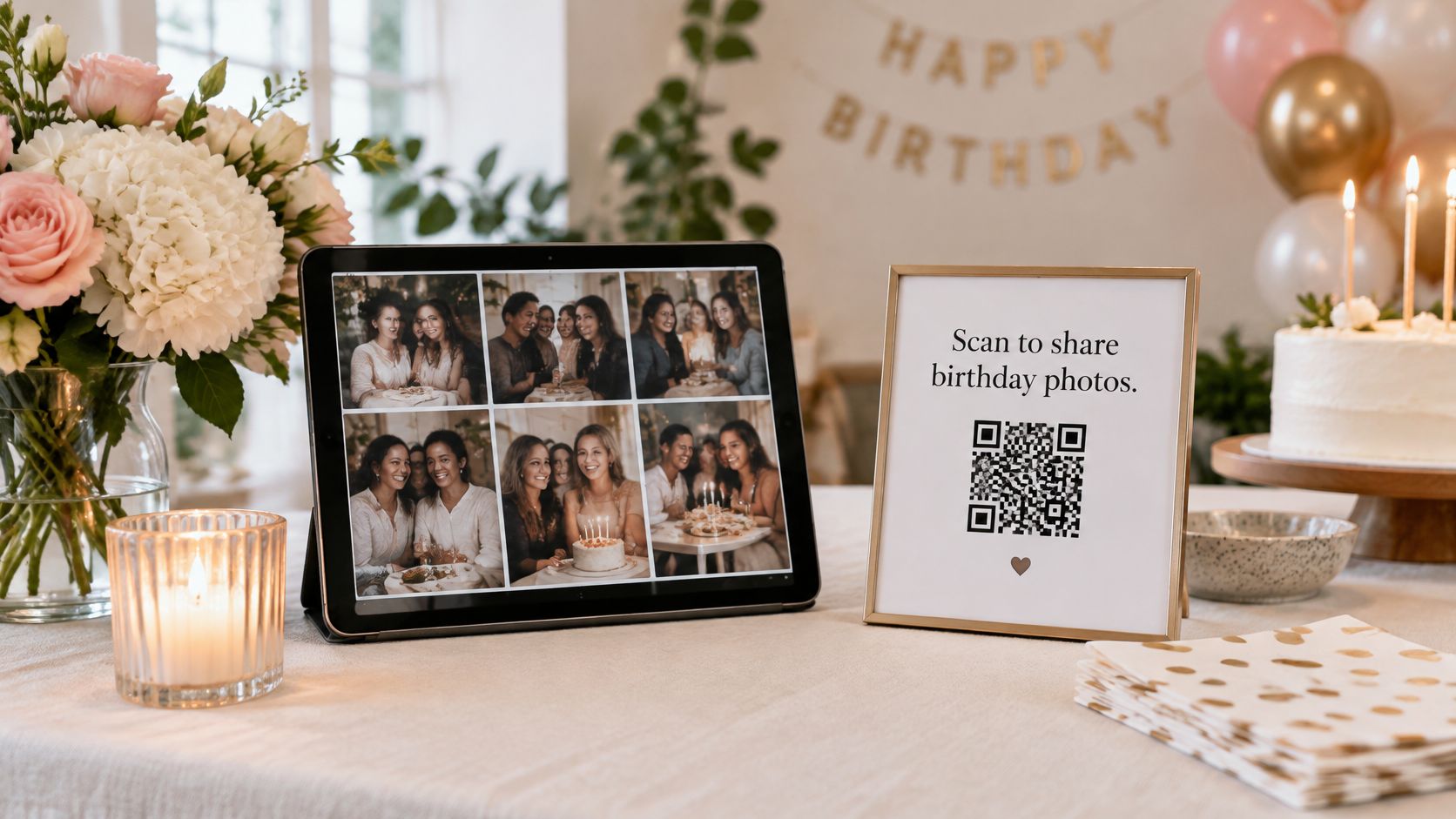
Research on hybrid photographic artefacts found that visitors engaged at three levels, physical placement, aesthetic content, and linked digital content, with engagement starting at the photograph, moving to scanning, then returning as longer attention on the combined artefact, as described in the study of hybrid photographic artefacts. That's why the code shouldn't sit alone in a corner. Put it next to printed photos or a welcome sign, and you've created a loop between the room and the gallery.
How to Set It Up Well
- Build the page early: Add the birthday person's name, party colors, and a short welcome message before invitations go out, then test a full upload yourself.
- Place codes where people pause: Table cards, the entrance, the cake table, and a photo booth corner all outperform a single sign by the door.
- Label it plainly: “Scan to share your birthday photos” works better than clever wording guests have to decode.
- Screen placement matters: Put the live feed near food or drinks, where guests naturally gather and notice their photo appear.
If you're adapting this for your own event, guidance on using a photo QR code for a party covers the practical setup. The trade-off is moderation. Decide before guests arrive whether uploads appear instantly or need approval, especially with children present.
This short walkthrough shows a live upload wall in action, so you can judge whether the pace suits your room.
2. Instant-Camera Guest Photo Guestbook
Buy more film than you think you'll need. That's the first lesson for an instant camera station, because running out midway through the evening is the most common failure and there's no quick fix once the party's underway.
Set out a Fujifilm Instax or Polaroid camera with spare film, a fine marker, and a paper guestbook or pinned board with clips. A guest takes a photo, writes a message on the white border or back, and adds it to the book. You get handwriting, slightly imperfect prints, and expressions people wouldn't pose for on a phone.
The result holds up as a physical guestbook the birthday person revisits. Phones produce cleaner images, but a signed print from a grandmother or a school friend carries a different kind of value. It also suits guests who don't want to upload anything.
Making Participation Easy
- Give a prompt: A sign reading “Your best birthday memory of me” prevents blank-page hesitation.
- Staff it briefly at the start: Ask one confident guest to take the first photos, and others will copy the behavior.
- Show an example: One finished print with a short message explains the whole process faster than written instructions.
- Protect the originals: Photograph or scan every print after the party so a spilled drink doesn't erase the only copy.
Pairing the book with a simple system for collecting birthday party photos means the prints and the phone photos end up in one place. On cost, be honest with yourself. Film adds up quickly for a large party, so this works best for smaller gatherings or as one station alongside a digital option rather than the only way to collect images.
A signed instant print is rarely the sharpest photo from the night. It's often the one people keep.
3. Life-Timeline Photo Banner
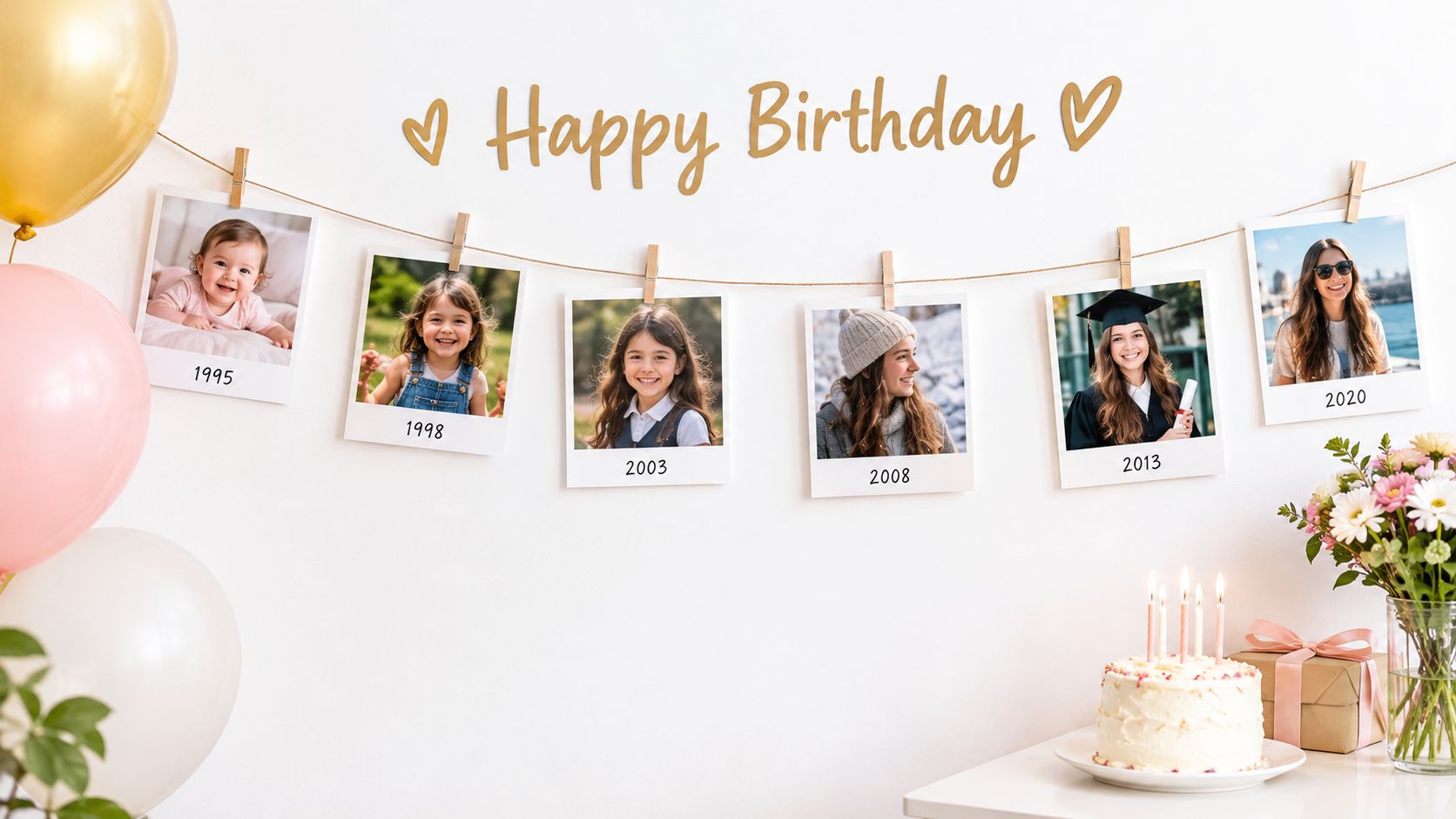
For a milestone birthday, chronology does most of the storytelling for you. String photos across a wall or along a table in order, label each with the age or year, and let guests walk from baby pictures to last summer. A 50th with one photo per decade reads differently from a first birthday showing each month, but the structure is the same.
There's a long lineage here. The history of web based slideshows and earlier projection traces shared image displays from magic lantern shows around the 1600s, through photographic glass images by about 1900, to Kodachrome color film in 1935 to 1936, which made organized family slide shows practical at home. Your timeline is the same impulse in print. Individual images become a sequence everyone can follow together.
The hanging photos below show how a simple line of prints can carry a whole growing up story.
Where Timelines Go Wrong
Hosts usually start too late. Begin collecting 4 to 6 weeks before the party, because relatives need time to find prints, and someone always has the one essential photo in a drawer. Ask everyone to send images through a single upload link so you're not hunting across email threads and chat apps.
Scan original prints at 300 dpi, a common standard for printing, before you arrange anything. Then pick one consistent clip or frame style. Mixed sizes are fine, but mixed mounts make a careful timeline look accidental. Leave breathing room around landmark years, and add one line of context under photos guests won't recognize, such as a place name or the people pictured. That small effort turns looking into conversation.
4. Photo Garland with Clothespins
A garland is the lowest barrier display on this list, and that's its strength. Photos clipped to string, ribbon, or wire with small clothespins can cross a mantel, a doorway, or the front of a dessert table. You don't need a frame, a screen, or reliable Wi-Fi, and you can rearrange it in minutes if the layout feels crowded.
The example below pairs hanging prints with fairy lights and a birthday sign, a combination that works well for evening parties.
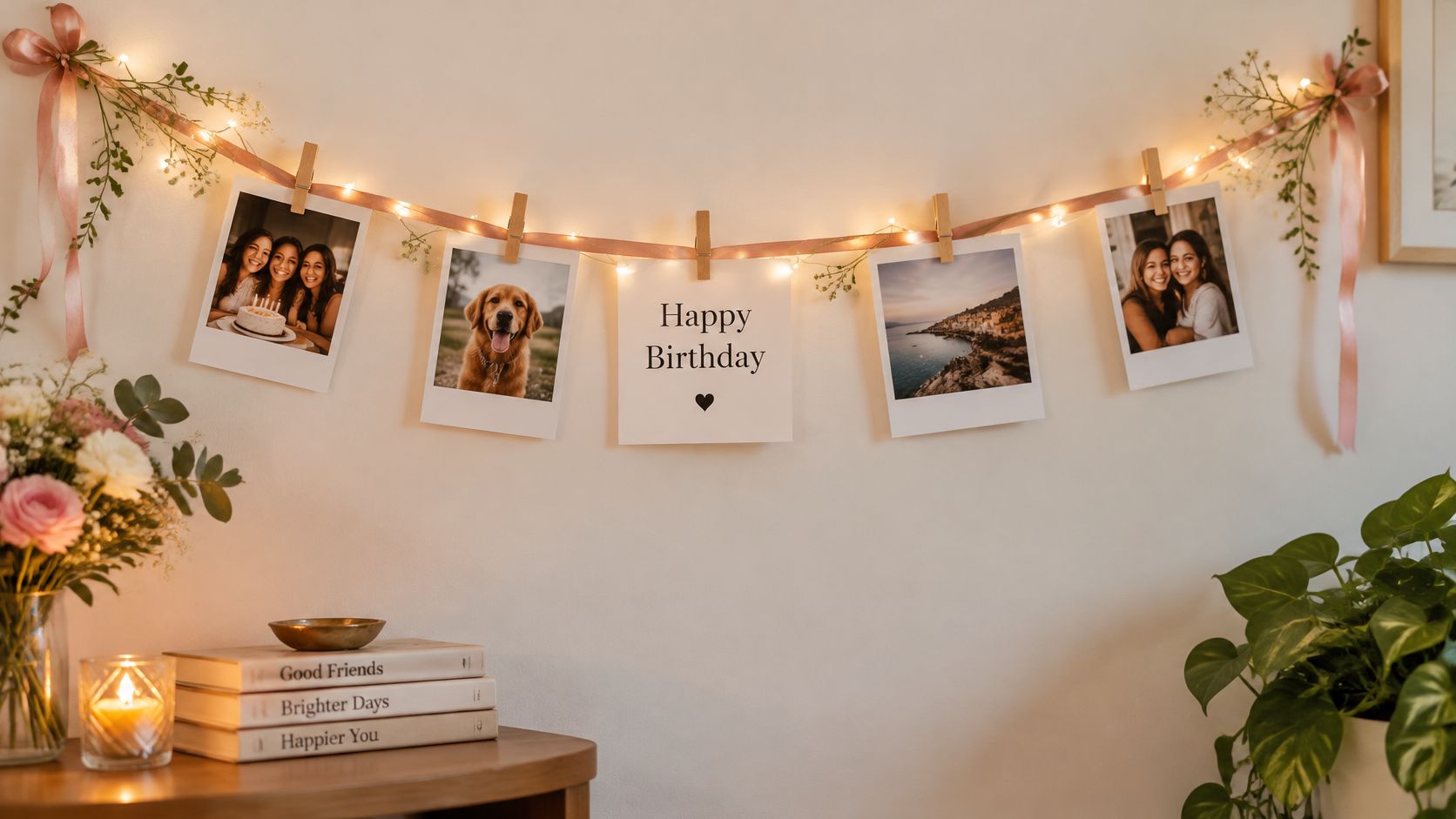
Use wooden or mini clothespins that grip without denting prints, and anchor the string firmly with command hooks so the middle doesn't sag once you've hung twenty photos. Test the weight before guests arrive. A garland that slips off the wall during the cake cutting is memorable for the wrong reason.
Keeping It Fresh During the Party
A garland doesn't have to be finished before the doorbell rings. If you've got a small home printer or an instant printer, print a few of the most recent guest uploads during the party and clip them in. Guests notice when a photo they took an hour ago joins the childhood pictures, and it signals that their contributions matter.
Alternate photo sizes for visual interest, but keep faces at a readable scale. Tiny prints look charming in a product photo and illegible across a real room. For outdoor parties, weigh the ends down and expect wind to flip prints over, so choose images that still work if they spin, or clip each photo at two points.
The honest limitation is capacity. A garland holds a curated selection, not an archive, so decide your theme first, whether that's family holidays, school years, or friends through the decades.
5. Looping Digital Slideshow on a Smart TV or Smart Display
A looping slideshow is the display you choose when you want photos present all evening without asking guests to stop and interact. A TV, tablet, or smart display cycles through images of the birthday person, and people catch different moments as they pass with a drink. Samsung's The Frame can show photos in an art mode that resembles framed work, while a Google Nest Hub can display albums from a connected account on a countertop.
That passivity can be a weakness. A peer reviewed study of South Korea's Yumi's Cell exhibition used computer vision analysis of visitor Instagram posts and found that participatory exhibition features produced photos showing active interaction, mimicry, and performance, while selfies were only a limited share, according to the research on participatory exhibition photography. Applied to a birthday, a prompt beside the screen, such as asking guests to recreate a childhood pose from the slideshow, turns background viewing into something people join.
Practical Settings That Matter
- Test a day early: Check playback speed, photo order, cables, and whether the screen sleeps after inactivity.
- Fit, don't crop: Set the display to fit photos to the screen so faces at the edge aren't cut off, and accept side bars on vertical phone shots.
- Mind the competition: Place the screen where guests can see it without it competing with the cake or food station for attention.
- Plan the export: Save the full set afterward in original quality so family can replay the sequence later.
If you're building a video version rather than a photo loop, a slideshow video maker comparison can help you weigh editing tools. Keep music low or off. The slideshow should support conversation, not compete with it, and captions help when the room is loud.
6. Memory Tree
A memory tree asks more of guests than a slideshow, and gives more back. You set up a decorated branch in a heavy vase, a wire tree, or a paper tree mounted on the wall. Guests choose a printed photo, write a memory or wish on a tag, and hang both on a branch with a small clip or ribbon loop.
By the end of the night the tree holds short, specific stories that a guestbook rarely produces. Someone writes about a camping trip. Someone else remembers a first day at school. Because each note sits beside a photo, guests who don't know each other can still follow the thread.
Put the tree near the sign in table or entrance, where people arrive with a free moment, rather than beside the food where their hands are full. Print photos in advance from original quality downloads so they don't look soft at close range, since guests will hold these rather than view them from across the room.
Details That Lift Participation
- One clear prompt: "Share a memory" on a small sign, plus pens that work and tags large enough for a few sentences.
- Pre hang a few examples: An empty tree intimidates people, while three finished tags show the expected length and tone.
- Sturdy base first: A branch that tips over under the weight of tags is the main structural risk, so weight the vase and test it loaded.
Practical rule: If a guest needs more than a few seconds to work out what to do at a display, most will quietly walk past it.
Accessibility needs thought too, as noted below in the closing guidance. Offer a table level option for guests who can't reach high branches, and let someone write a tag on another guest's behalf.
7. Photo Mosaic Backdrop
A photo mosaic is the most production heavy idea here, and the most striking at a distance. Hundreds of small tile photos combine to form one large image, often a portrait of the birthday person or a milestone number. Guests step back to read the big picture, then move in close to find themselves in the tiles.
The number shaped collage below shows why this format doubles naturally as a photo backdrop.
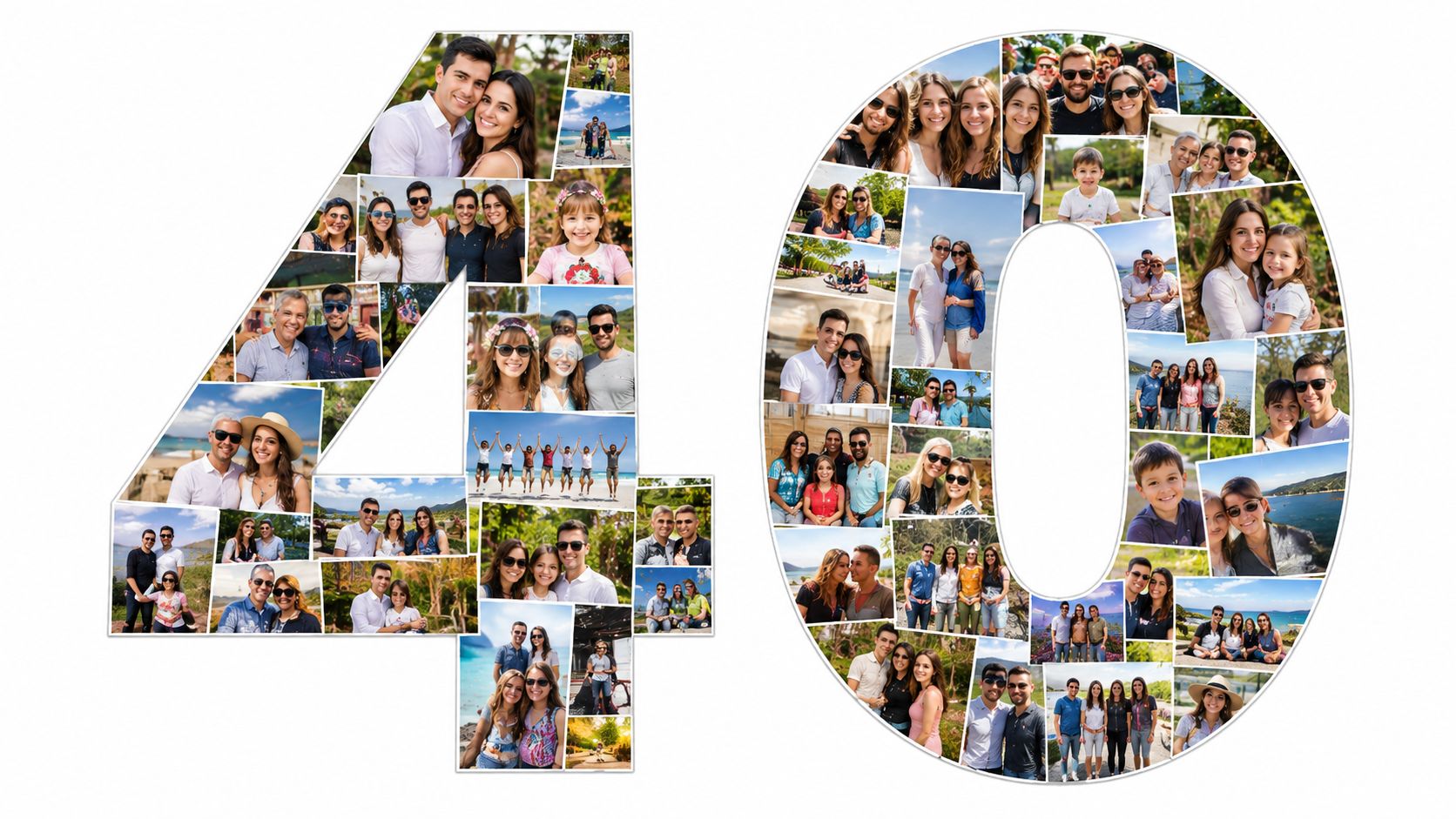
Start with a high contrast source image. A softly lit portrait with similar tones across the face turns muddy when it's rebuilt from small photos, while a bold number or a clear silhouette stays recognizable. Use mosaic software or a printing service that specializes in photomosaics, and check the minimum number of photos required before you promise anyone a finished piece.
Collecting tile photos is where projects stall. Send relatives and friends one upload link, give a firm deadline, and follow up once. If you're weighing this against other interactive options, ideas for photo booth alternatives put the effort in context. Order the print at least two weeks before the event to allow production and shipping, and inspect a proof on a large screen, not just your phone.
Think about what happens afterward. A mounted mosaic needs wall space at home, so consider size and framing early if you'd like it displayed long term, and compare picture frame materials and sizes before ordering. For a single evening, a foam board print is lighter, cheaper, and easier to move.
8. Photo Memory Jar
A memory jar is the quietest display on this list, and sometimes the most used. Fill a large jar, vase, or box with small printed photos and memory cards. Each photo carries a caption or a short note from the person who supplied it, and guests pull one out, read it, and pass it around the table.
It works particularly well at seated dinners and smaller family parties, where a big screen would dominate. There's no queue, no instructions to follow, and no technology to fail. A shy guest who wouldn't perform at a photo booth will often happily read a card aloud.
Print photos in a consistent small size so they fit through the jar opening and don't fold at the corners. A sign reading “Pull out a memory and read it aloud” gives permission to handle the contents, which guests otherwise hesitate to do with something that looks like decoration.
Keeping It Going After the Party
- Refill during the event: Add a few fresh prints from the guest gallery partway through, so later guests find photos from the same afternoon.
- Leave blank cards: Guests who didn't send a photo in advance can write a memory on the spot and add it.
- Store it as the keepsake: The filled jar goes home with the birthday person and needs no album assembly afterward.
Privacy is easier here than with a big screen, but it still deserves a decision. A 2025 University of Southampton survey of more than 1,000 UK parents found that 45% actively post images of their children on social media and one in six reported that their child had experienced harm connected with that sharing, a finding reported in coverage of the research on children and shared photos. Keep identifying details such as school names off captions, and check with parents before printing a child's photo for a shared display.
Birthday Party Photo Display Ideas: 8-Option Comparison
| Photo Display Idea | 🔄 Setup Complexity & Resources | 📊 Expected Outcome | ⭐ Ideal Use Case | 💡 Key Advantage |
|---|---|---|---|---|
| Live QR-Code Guest Photo Wall | Moderate; upload page, QR codes, display screen, and reliable internet | Live gallery grows as guests contribute photos | Interactive parties where guests use phones | ⚡ No app or account needed; captures candid guest perspectives |
| Instant-Camera Guest Photo Guestbook | Low to moderate; instant camera, film, markers, and album or board | Physical photos paired with handwritten messages | Parties seeking a tangible, personal keepsake | Guests leave with an immediate print and message |
| Life-Timeline Photo Banner | Moderate; collect, scan, print, and label photos in advance | Chronological display that prompts stories and reminiscing | Milestone birthdays and anniversaries | Tells the honoree's story at a glance |
| Photo Garland with Clothespins | Low; string or ribbon, clips, and printed photos | Casual decorative display that can be updated during the event | Budget-friendly parties or smaller spaces | ⚡ Quick, inexpensive, and easy to customize |
| Looping Digital Slideshow | Moderate; screen, power, photo album, and playback setup | Continuous photo display that runs unattended | Events with a TV, tablet, or smart display | Reusable and easy to update without printing |
| Memory Tree | Moderate; branch or tree structure, printed photos, tags, and pens | Interactive display of photos and guests' written memories | Parties where a centerpiece and keepsake are desired | Combines visual decoration with personal messages |
| Photo Mosaic Backdrop | High; many photos, design software or service, and large-format printing | Striking image composed of smaller photos | Photo-op areas and major milestone celebrations | Unites many contributions in one memorable backdrop |
| Photo Memory Jar | Low; jar or box, small printed photos, and memory cards | Guests browse photos and messages at a table | Intimate gatherings or simple, portable keepsakes | 💡 Low-cost, interactive, and easy to save afterward |
Build a Display Guests Will Remember
Choose by emotional purpose first, and by looks second. If you want energy and candid coverage, a live QR code wall gathers moments you'd never catch yourself. If you want storytelling, a timeline or memory tree gives guests a reason to slow down and talk. If you want something to keep, an instant camera guestbook or memory jar leaves the birthday person with an object, not just a folder of files.
Many parties work best with a pairing rather than a single hero display. One printed piece at the entrance sets the story, one screen in the main room shows the party as it happens, and one small interactive station gives guests something to make. That combination covers people who love uploading and people who'd rather write a tag by hand.
Don't assume everyone in the room can use the same route in. Guidance collected in the advice on being mindful of accessibility supports planning participation in advance rather than adding fixes later. In practical terms, that's large, high contrast captions for older guests, a slideshow that works silent or subtitled, placement people can read while seated, and a simple link or a staffed upload spot for anyone who can't scan a QR code or is using an older phone.
Consent belongs in the plan too, not as an afterthought when a photo appears on a screen. Separate permission to display a photo in the room from permission to download or share it afterward, pre approve images that include children, and make it easy for a guest to opt out without a public explanation. A short note on the invitation and a visible sign at the venue handle most of this.
Before the First Guest Arrives
- Test the full flow: Scan your own QR code, upload a photo, watch it appear, and download it again, using the same Wi-Fi or mobile signal guests will have.
- Print backups: A small stack of key photos covers you if a screen, cable, or connection fails.
- Label every display: One line explaining what to do removes most hesitation.
- Assign one monitor: Give one person the job of checking uploads, refilling film or tags, and helping anyone stuck.
That's the difference between a display that looks good in your setup photo and one that's still working at the end of the night. With EventUploader, you can collect guest photos and videos through one link or QR code, show them in a slideshow, and download everything in original quality afterward, so the printed timeline, the garland, and the digital gallery all draw from the same set of memories instead of scattered chats. Pick the format your guests will use, test it once, and let the display do the rest.
Set up your birthday gallery in minutes with a branded upload page and one printable QR code, then let guests add photos and videos from their phones with no app or account to figure out. You can show the best uploads live, download everything in original quality, and share the finished gallery on the same link afterward. Start planning your display today with EventUploader.